


When working with Firebase you have a wide range of regions to choose from to better support users around the world. However, knowing what to choose and how to support more than one region can be confusing. In this article we'll walk through the basics of region selection and try to answer some questions to help you get started.
The following guide assumes you've already created a new Firebase project and are working on configuring the regions.
Firestore Region
We'll start in the Firebase Web Console by creating a new Firestore database and selecting the region.
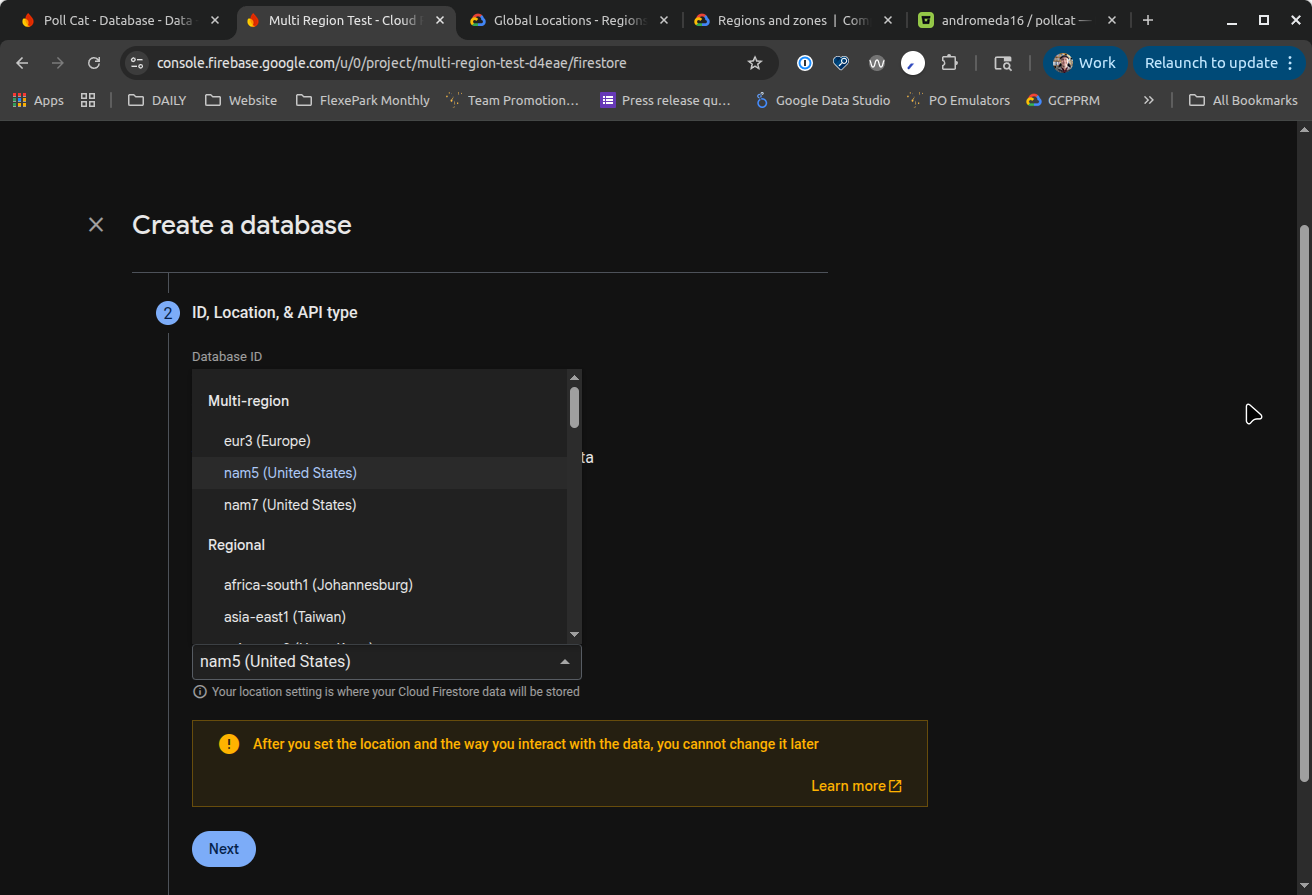
Pay special attention to the multi-region options eur3, nam5, and nam7 which allow other services to be deploy to a more than one single region. You can read Cloud Firestore locations for more details.
Function Region
Next we'll configure our functions with a compatible region. In most situations this will match your Firestore region, but if you selected a multi-region location before you'll need to choose one (or more) of the compatible regions here. For example, if you chose eur3 before you can choose europe-west1 now.
export const deleteQuizMessageHandler = onMessagePublished<{ quizId: string }>({
  topic: PubSubTopics.deleteQuiz,
  region: 'europe-west1'
}, async (event) => {
  // Do Stuff
})


export const quiz_delete_onCall = onCall({
  region: [ 'europe-west1' ]
}, async event => {
  // Do Stuff
})
Note that it's possible to provide an array of regions for many functions, allowing the function to be deployed multiple times (once per region). PubSub functions are single region, however.
Client Region
If you're using just a single region the client region should match the function region, but if you're using a multi-region configuration you'll want to provide a front-end mechanism for choosing the appropriate region for the user. This could be a domain configuration, user selection, or something else.
    provideFunctions(() => {
      const functions = getFunctions(undefined, 'europe-west1')
      if (environment.useEmulator.functions) { connectFunctionsEmulator(functions, '127.0.0.1', 5001) }
      return functions
    }),
In the above Angular example we've configured the SDK to use the europe-west1 region for all onCall function calls to match our function configuration. Note that if our functions are deployed to multiple regions we can choose any valid region here.
Hosting Configuration
If you use Firebase hosting, the rewrite configuration can be used (possibly instead of the client application code) to provide the function region. You can configure a rewrite with regions like this:
      {
        "source":  "/api/delete",
        "function": {
          "functionId": "quiz_delete_onCall",
          "region": "europe-west1"
        }
      }
You can use this to provide a default region configuration or you can provide region-specific urls to your functions.
Summary
Creating multi-region apps is hard, but configuring regions in Firebase doesn't have to be. You now know the 3 easy steps:
- Specify region for Firestore database
- Select one or more compatible regions for other services, including functions
- Configure your front-end application to use the correct region for function calls, using client code or hosting configuration
If you encounter challenges along the way, or if you use this guide to successfully configure your regions, please let me know either way.